Do you know why it is so damned hard to figure out how to remove your watch history from Netflix, so that you can start watching something – such as a series – from the beginning again? Here’s why! BECAUSE NETFLIX TOTALLY HID THAT BALL BY CALLING IT “HIDE”!
WTAF?? Somebody needs to buy Netflix a dictionary, because in *no world* does “hide” mean “delete”. Hide means *it’s still there*, you just can’t see it!
So, here are the steps to *actually delete and remove* your watch history!
How to Actually Delete Your Netflix Watch History
Log into your Netflix account on a computer. If you have more than one person (account) within your main account, click on the account whose watch history you want to remove.
Go to something that says some version of “viewing activity” or “watch history” or “history” (depending on what they are calling it this week).
Now, next to each entry (for example a series episode) you will see a circle with a line through it.
If you click on that circle with a line through it, it will “unwatch” that particular episode. But that’s probably not what you want. You want to delete the whole darned watch history.
Go down to the bottom of the page.
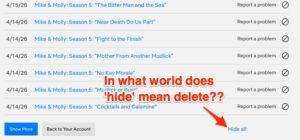
Click on “Hide all” which *actually* means “delete my watch history”.
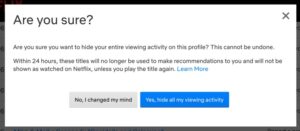
Curse Netflix for their stupidity, thank me for releasing you from this hell, and start watching that show again.